
The Problem Was a Corroded Charging Port
A MacBook Pro that keeps crashing or restarting unexpectedly doesn’t necessarily have a faulty logic board. In this repair, we traced the problem to corrosion on the charging port – even though the MacBook was still charging.
At Device Repair Guy in Wellington, we regularly diagnose MacBooks with unusual and intermittent faults. One recent repair demonstrated how a relatively small component can cause what appears to be a serious hardware problem.
The customer brought in a MacBook Pro M1 that was randomly crashing. The laptop could still charge, which made the actual cause of the problem less obvious.
Our investigation eventually identified corrosion on the charging port assembly.
The Problem: MacBook Pro M1 Crashing Unexpectedly
Random crashes on a MacBook can be frustrating because they don’t always point to an obvious hardware fault.
Possible symptoms of this type of problem include:
- MacBook randomly shutting down or restarting
- Unexpected crashes during normal use
- MacBook charging normally but behaving unpredictably
- Intermittent power-related problems
There are many possible causes of these symptoms, including software problems, power management faults and logic board failures.
In this case, however, the problem was traced to the charging port.
Finding Corrosion on the MacBook Charging Port
During the investigation, our technician disassembled the MacBook Pro and removed the logic board to access and inspect the internal components.
A closer examination of the charging port assembly revealed corrosion around the electrical contacts.
The corrosion is clearly visible in the close-up photograph.
What made this fault particularly interesting was that the MacBook was still charging despite the damaged port.
A charging port doesn’t necessarily have to stop working completely to cause problems. Corrosion can interfere with electrical connections and potentially cause intermittent power or communication faults.
In this MacBook, the corroded charging port was identified as the cause of the random crashes.
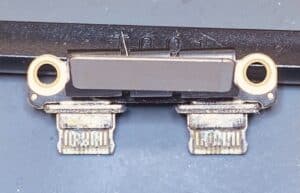
Photo: Close-up of the corroded MacBook Pro M1 charging port showing damage to the connector contacts.
Why Can a MacBook Crash Even When It Still Charges?
Many people assume that if their MacBook is charging, the charging port must be working correctly.
Unfortunately, that’s not always the case.
A charging connection can continue to deliver power even when some electrical contacts are damaged or corroded.
Depending on the design of the charging system, corrosion may cause:
- Unstable electrical connections
- Intermittent power delivery
- Problems with charging-related communication or detection
- Unexpected system behaviour
This means a MacBook can appear to charge normally while a charging-related hardware fault remains present.
Importantly, random crashes do not automatically indicate a charging port problem. Proper diagnosis is needed to establish the cause.
The Repair: Replacing the Charging Port Instead of the Logic Board
The good news is that on this MacBook Pro M1, the charging port assembly is a separate, replaceable component.
This makes a significant difference to repair costs.
Rather than replacing or attempting extensive repairs to the entire logic board, we could address the fault by replacing the affected charging port assembly.
Replacing a separate charging port is generally much less expensive than replacing a MacBook logic board.
The repair involved disassembling the MacBook, accessing the charging port assembly and replacing the corroded component.
This is a good example of why identifying the actual cause of a fault is so important before recommending expensive repairs.
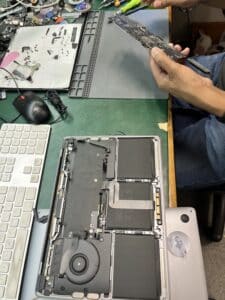
Photo: MacBook Pro M1 disassembled with the logic board removed during diagnosis and repair.
Why Proper MacBook Diagnostics Matter
A MacBook that randomly crashes can easily be mistaken for a laptop with a serious logic board failure.
In some cases, customers may be advised that the entire logic board needs replacing, which can make the repair uneconomical.
However, faults involving charging ports, connectors, cables and other replaceable components can sometimes produce similar symptoms.
At Device Repair Guy, we investigate hardware faults at component level wherever practical, rather than automatically recommending replacement of expensive assemblies.
This approach can help identify more economical repair options and extend the useful life of a MacBook.
MacBook Pro Charging Port and Random Crash Repairs in Wellington
If your MacBook Pro or MacBook Air is randomly crashing, restarting, shutting down or experiencing charging problems, our technicians can investigate the cause.
We offer MacBook repairs in Wellington, including:
- MacBook random shutdown and restart diagnostics
- MacBook charging port replacement
- USB-C and MagSafe charging fault investigation
- MacBook logic board diagnostics and component-level repairs
- Corrosion and liquid damage assessment
- MacBook power management fault investigation
Not every MacBook crash is caused by a faulty charging port, but this repair shows why it’s worth investigating the smaller components before assuming the worst.
Having problems with your MacBook?
Bring it to Device Repair Guy for professional diagnosis and repair.
Device Repair Guy – MacBook Repairs Wellington
57 Willis Street, Wellington