
Two Steam Decks, Two Very Different Board-Level Repairs
We recently had two identical Steam Deck LCD models in our workshop at the same time. Although the devices looked the same from the outside, they had completely different faults.
One Steam Deck powered on but had no image on its built-in screen. The other had severe charging problems, intermittent power-button operation, and controls that were not responding correctly.
Both repairs showed why accurate diagnosis is important. In each case, the initially suspected part was not the true cause of the problem.

Steam Deck Repair One: No Image on the Built-In Display
The first Steam Deck arrived with a black internal screen.
The charging light responded when power was connected, but nothing appeared on the built-in LCD. The device was drawing approximately 15V at 1.8A, indicating that it was accepting power.
After opening the Steam Deck, we confirmed that the internal fan was operating and connected the device to an external monitor. The Steam Deck booted normally into SteamOS and produced a clear image externally.
This told us that the device itself was running, but the internal display system was not functioning correctly.
Ruling Out a Firmware Problem
A firmware or SteamOS update was initially considered as a possible cause. A pending system update was installed, but the built-in screen remained black.
The internal display was also not detected in SteamOS display settings, suggesting that the issue was more likely to be within the display hardware or the communication circuit between the mainboard and LCD.
Testing the Screen and Connector
The internal LCD cable was reseated, and the display connector was inspected under a microscope.
The connector pins were resoldered to rule out a poor connection, but the fault remained.
A replacement LCD was then connected to the Steam Deck. The replacement screen also remained blank.
To confirm whether the original screen was faulty, we tested it using a known-good Steam Deck mainboard. The original LCD worked normally.
At this stage, we had confirmed that:
- The Steam Deck booted normally.
- External display output worked.
- The original LCD screen was functional.
- A replacement LCD also failed on the customer’s mainboard.
- The display cable and connector were not the cause.
The fault was therefore located on the Steam Deck mainboard.
Faulty ANX7580 Display Bridge IC
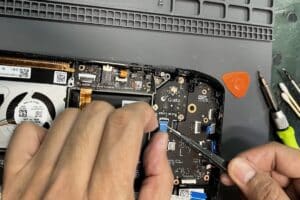
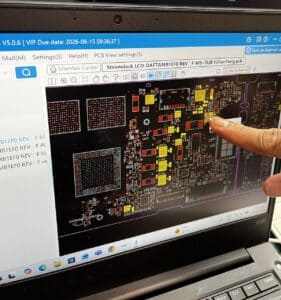
Further component-level diagnosis identified a failed ANX7580 display bridge IC.
The ANX7580 is part of the circuit responsible for transferring the display signal from the Steam Deck mainboard to the internal LCD. When this IC fails, the Steam Deck may continue to operate normally through an external monitor while the built-in screen remains completely black.
We replaced the ANX7580 IC and retested the device.
The internal display immediately began working normally.
The Steam Deck was then reassembled and fully tested. The built-in display, external display output, charging, buttons, speakers, Wi-Fi, and general operation all passed testing.
What the Customer Said
The customer later left us a five-star Google review after receiving the repaired Steam Deck:
“The device looks flawless and is running perfectly. I was especially impressed with your honesty, the care taken with the repair, and the communication throughout the process.”
Steam Deck Repair Two: Not Charging and Intermittent Controls
The second Steam Deck was brought in because the customer believed the USB-C charging port needed to be replaced.
The device could take several days of continuous charging to gain only a small amount of battery power. When the Steam Deck was being used, the battery sometimes discharged faster than it could charge.
The power button was also intermittently unresponsive, and the device sometimes failed to shut down correctly through SteamOS.
Once the Steam Deck was opened, it became clear that the charging port was not the main problem.
Corrosion and Liquid Damage on the Mainboard
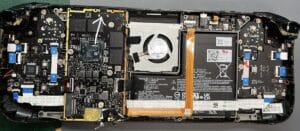
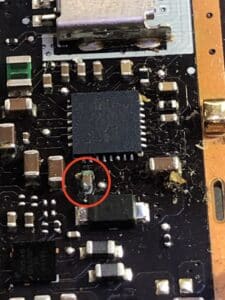
Inspection under magnification revealed corrosion on the main logic board, including damaged components within the power-management circuit.
The charging fault was traced to the MAX77961 power-management IC, along with several nearby liquid-damaged components.
The MAX77961 helps manage USB-C power input and battery charging. A fault in this circuit can result in symptoms such as:
- Extremely slow charging
- Unstable charging
- The battery losing power while connected to a charger
- Intermittent power-on behaviour
- Failure to recognise or correctly negotiate USB-C power
The USB-C charging port itself was inspected and tested and was found to be functioning correctly. Replacing the port would not have resolved the fault.
The damaged power-management IC and affected components were replaced, and the corroded areas of the mainboard were cleaned and repaired.
Following the board-level repair, the Steam Deck powered on normally and began charging correctly.
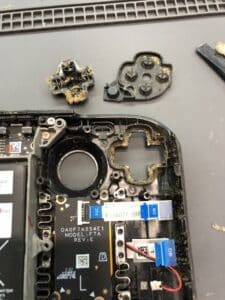
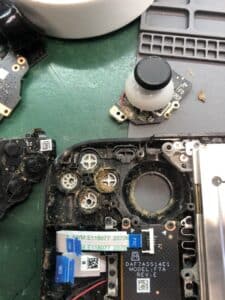
A Button and Directional Controls Not Working
The A button and directional controls were also not responding reliably.
A significant buildup of dirt, debris, and contamination was found around the internal button mechanisms. The affected button assemblies and surrounding areas were thoroughly cleaned before the Steam Deck was reassembled.
After cleaning, the A button and directional controls returned to normal operation.
The completed Steam Deck was tested for charging, power-on operation, shutdown, buttons, directional controls, and general performance.
Why Diagnosis Matters
These two Steam Deck repairs are good examples of why replacing the part associated with a symptom is not always the correct solution.
The Steam Deck with no internal display did not need a new LCD. Its screen worked correctly, and the actual fault was the ANX7580 display bridge IC on the mainboard.
The Steam Deck with charging problems did not need a new USB-C port. Its charging socket was functional, while the real fault was within the MAX77961 power-management circuit and surrounding liquid-damaged components.
Replacing either the LCD or charging port without completing further diagnosis would have added unnecessary cost without fixing the devices.
Component-Level Steam Deck Repairs
Steam Deck faults can be caused by damaged ports, displays, batteries, cables, software, or components on the main logic board.
Our technicians can diagnose and repair a range of Steam Deck faults, including:
- No display on the internal screen
- External display works but the built-in LCD remains black
- USB-C charging problems
- Slow or intermittent charging
- Steam Deck not powering on
- Liquid damage and corrosion
- Buttons or directional controls not responding
- Mainboard and power-management faults
Where possible, we repair the damaged circuit or component rather than replacing the entire mainboard.
Liquid-damaged devices can develop additional faults over time, even after the affected areas have been cleaned and repaired. For this reason, warranty coverage may not be available for repairs involving corrosion or liquid damage.
Both Steam Decks were successfully repaired, reassembled, tested, and returned to normal operation.
Contact us now if you need your game console looked at.